Week of November 2–8, 2026: Keys, trays and routes
· Week of November 2–8, 2026
Heads up: what follows hops from stream insects to GPX routes to a kitchen tablet and back, with no apology. It's the full blend of ideas from an ecologically minded teacher and cyclist who builds tools to make some jobs easier and life more fun, which is a polite way of saying hodgepodge. If you'd rather skip the hopping and get just the facts, gethabitatlens.app is waiting. Everyone else, continue at your own risk.
This week's route: identification keys and stream photos first, then the camera-trap and sound-recorder phones, a stop in the classroom, a long ride with Bike Power and Safe Trip, and home to the everyday tools.
The HabitatLens suite
Identification keys, made and shared by you. Last week HabitatLens learned to score a stream's health from the small animals living in it. This week it learned to help you tell them apart.
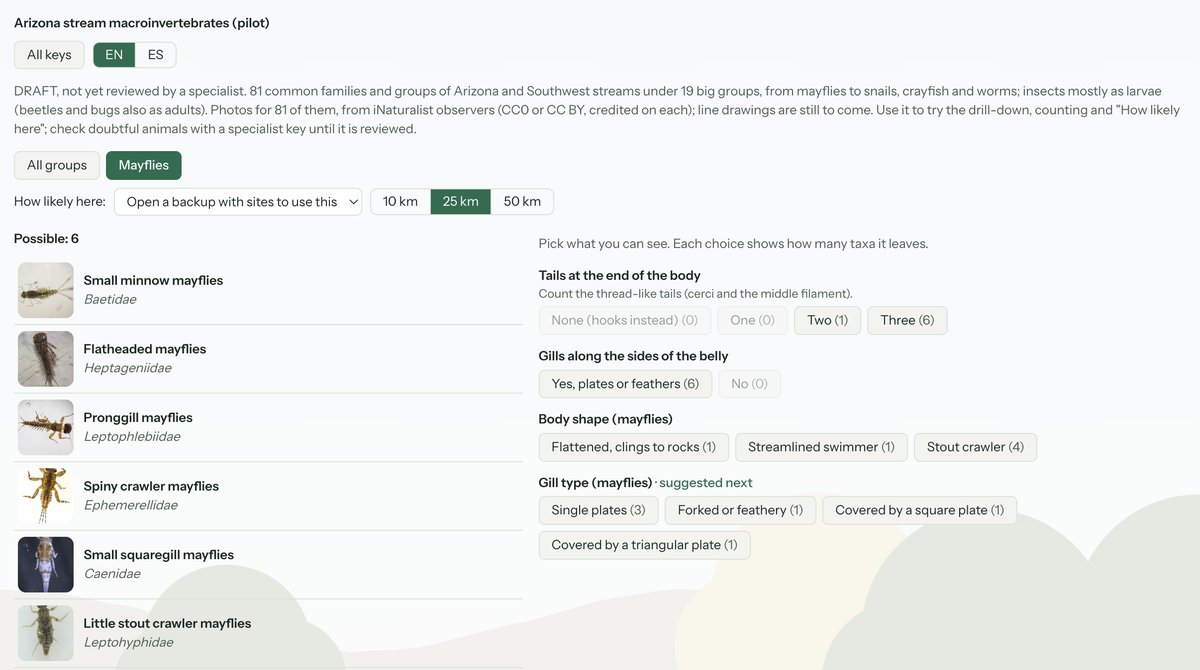
- Drill-down keys. Open a key in the phone app or Desktop, start from a big group such as mayflies or beetles, and narrow it down level by level by the features you can see.
- Counts that go somewhere. Tally what you find in the key and the numbers drop straight into a stream-health sample, rolled up to family for scoring, with an Unknown option and undo. You can also send the animals at the current level to Field Counter as a species list.
- Is it common here? Each entry carries one of five labels based on open GBIF records near your site, or Unknown when the data are thin.
- Two pilot keys, both drafts. Arizona stream insects covers 81 groups and families, every one with a photo. Andean Ecuador covers all 72 groups of the Andean Biotic Index, in English and Spanish, with photos for nearly all of them. The pictures are open-licensed photos from iNaturalist plus 24 of my own from Archidona, with credits kept beside each one.
- Make your own. Desktop has a key maker that works offline. You can share a key to a public library (each one goes through an approval page first), download keys made by others onto Desktop, the web edition and the phone, and turn on alerts when a key you downloaded gets a new version.
Tray photos for stream samples. Stream samples have a new Tray photos tab. Photograph your white sorting tray and the phone finds the tray, checks the exposure and quality, works out the scale and saves the photo with your record. Android matches the iPhone.
A guided survey module. A new phone module walks you through a field protocol one step at a time, with a short "Why we ask" note under each question when teaching mode is on. A measured field such as altitude is filled in from the phone's barometer, or GPS if there isn't one. The first protocols are a river water-monitoring protocol for an Ecuadorean river system in English and Spanish, plus beaver survey and stream-flow monitoring templates. I'll be testing the module during a beaver survey in December.
Phones and Desktop talk to each other.
- Send to Desktop. A new phone screen pairs with Desktop and sends your field records from wherever you are, with thumbnails of site and plot photos, either right away or after you save.
- Protocol designer. In Desktop you can write a protocol's questions in English and Spanish side by side, preview it, and compare revisions. Then push the update to your team's phones. Retired questions keep their old answers.
- Releases. Phone 0.1.1 and Desktop versions 0.1.29 and 0.1.30 went out. Desktop can now tell you, if you turn it on, about every version since the one you currently have installed, with an accompanying "Download for this computer" button.
More for Desktop and Studio (built this week, arriving in the next update):
- A change log for every record: who changed what, when, the old and new value, and on which device.
- Raven Pro selection tables and Timelapse CSV files, in and out.
- Import a whole AudioMoth or Song Meter recorder folder.
- Pollinator stations: visits per flower per hour, from FaunaLens Flower watch sessions.
- Calls per hour as a chart, tested against a simulated season of 200,000 recordings.
- A printable field guide (PDF) made from a Studio library.
- IUCN Red List categories shown next to the species recorded near a site.
- Sharper Sentinel-2 satellite imagery.
FaunaLens learns to spot animals. The big addition is Animal check. After the motion sensor triggers, the phone looks at the picture with MegaDetector v6, an open wildlife-detection model, and either marks it or drops it, so wind-blown grass stops filling your card. It labels the shot by the most confident find and carries a reptile warning. Also new:
- Pre-trigger video. Clips can start 2, 3 or 5 seconds before the trigger (off by default).
- Slow motion. Video at 120 or 240 frames per second where the camera supports it (off by default).
- HDR photos for harsh light, where the phone supports it (on by default, not with RAW).
- Flower watch, a starting point for pollinator stations, and starting points by animal size, with timer intervals of 5 to 30 seconds.
- Longer battery life on interval shooting: the camera switches off between shots, schedules can run dusk to dawn, and the app estimates how long the phone will last.
- The manual has new guides by animal size (large animals, lizards and small animals, ants and invertebrates, and microscope time-lapse), and a section on using a spare phone as a camera trap.
SongLens gets smarter about when to listen.
- Recording hours by sunrise and sunset, so the Dawn chorus starting point follows the sun (05:00 to 09:00 until the phone knows where it is).
- Starting points by target group: dawn birds, frogs at night, insects, an all-day soundscape and underwater.
- Noise check (Off, Mark or Drop) for sounds kept "when there is sound".
- Pre-roll of 2, 3 or 5 seconds, a FLAC option with storage and battery forecasts, a wind filter with a clipping warning, and a way to hear what triggered a recording.
Portuguese and French. The phone apps, Desktop and FaunaLens get first drafts in Brazilian Portuguese and French in the next update, waiting for a native-speaker review.
For teachers
- A creek lesson from start to finish. A class can sample a stream, photograph the sorting tray, work through a picture key to name the families, and score the stream's health, all in one app, with the "Why we ask" notes explaining each step as they go. The keys work offline, which matters on a creek bank.
- Students as key makers. The Desktop key maker could turn a class into authors: I'd love to see a group build a key for the insects of its own schoolyard.
- Bike Power for physics and environmental science. The Mac version can now export its charts (PDF or PNG) and data (CSV), with a classroom option, and compares the energy and CO2 per mile of a ride with other ways of getting around. It's a ready-made dataset for talking about transportation.
For cyclists

Bike Power (version 0.4 on iPhone and Apple Watch, with Mac, Android and Wear OS versions) had a week of new features:
- My routes. Follow a GPX or TCX route with spoken turns, save any ride as a route, and share rides as GPX. Before you set out, it tells you what a route will take: energy, time, battery and climbs.
- 3D map and hill profile for rides and routes on iPhone, Mac and Android, with manuals in English and Spanish.
- Post to Strava. Connect your account, then either get an offer after each ride or have rides posted automatically. If you're offline, the upload waits in a queue.
- Your share of the work. On an e-bike, Bike Power compares your heart-rate calories with the battery's, so you can see how much of the ride was you.
- After-ride battery pop-up. Turns out we were overestimating the battery usage for rides. Now the app suggests a 10-minute wait to rest the battery before taking a reading after a ride, with an in-app countdown. (Readings taken sooner than that will show a greater amount of battery depletion than actually occurred.)
- Mac extras. Compare a ride with the same route's all-time and last-month averages.
- iOS 27 windows. Bike Power, like most of my iPhone apps, now adapts to iOS 27's resizable windows, including landscape on the iPhone.
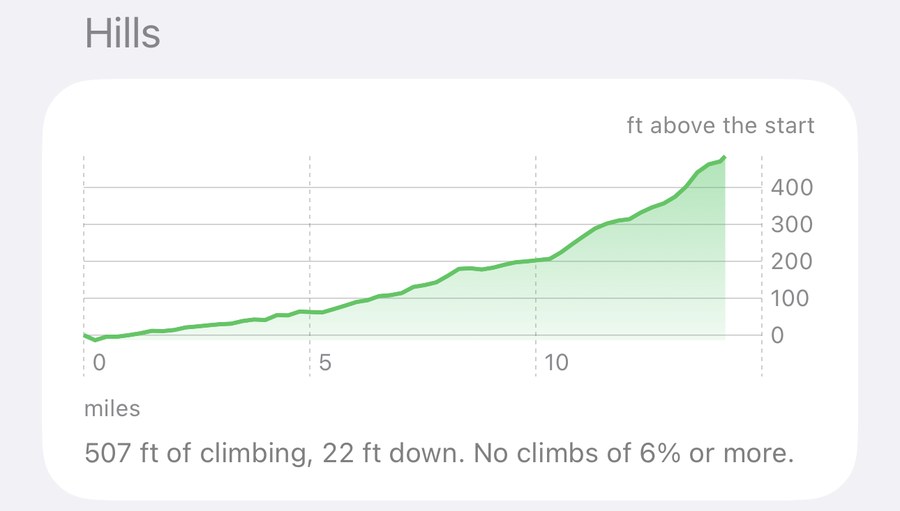
Safe Trip went from nothing to version 0.3.1 in a week, and it launches June 1, 2027. It plans long trips by bike, car, RV or on foot around travel advisories and hazards, and shows safer alternatives. I tested it by planning a one-day hike in Saguaro National Park East, as well as a bike trip from Tucson to Panama City:
- Suggested start times for day trips, so that you arrive 30 minutes before sunset at the pace you choose (relaxed, steady or fast), and how much water you need to carry.
- Go-through points, so a route takes the trail you prefer, with forecasts at each point. This matters a great deal when your elevation changes significantly, or if you'll be on the trail the whole day.
- Ahead watch checks the next three days of your route for earthquakes, floods, fires, storms and embassy alerts, now including US National Weather Service warnings and push alerts, plus an SOS button with emergency numbers for the countries you'll cross.
- Car and RV modes, and anonymous traveler reports of problems ahead.
Safe Trip is a planning aid, not a guarantee of safety, and says so on every screen.
Tools for daily life
- Many Hands, for dividing chores fairly in a group and launching December 8, gained a shared calendar link with an Add to my calendar button, a Need to buy list, and alerts when someone else ticks off a chore or uses the list. A shared-device mode for a tablet on the kitchen counter shows who is doing what, and resets itself when nobody is using it.
- Garden Grow now has a plant library of 150 plants with planting dates from the Phoenix and Tucson extension services, with sources, and it even speaks Brazilian Portuguese.
- Clepsydra, the desk companion, now shows a short "time culture" note on how different peoples have kept time, from Maya and Aztec calendars to Stonehenge and Kichwa traditions. A setting turns it off, and it works in English and Spanish.
- All my iPhone apps (ChargeMinder, Garden Grow, Many Hands, Training Wheels, VoiceBeHeard and FaunaLens among them) were adjusted for iOS 27's resizable windows, so they look right in landscape and on wide screens.
Field tests
I'm testing Garden Grow and HabitatLens on my school campus, which makes a fine proving ground for both. Bike Power continues to perform beautifully, and it will be the first app of the cyclist suite to be released, on March 2, 2027.
Testers and partners
Good news on testing: a Tucson NGO has agreed to try the apps. Our first beta tester, the Ecuadorean NGO, is still my reality check for everything above.
If you teach, do field work or run a community monitoring group, you can try the apps before anyone else. Write to me and I'll send you a test copy. Reviewers for the pilot identification keys, and Portuguese and French speakers to check the translations, are especially welcome.
Coming up next
- On the calendar. Many Hands on December 8; HabitatLens, HabitatLens Desktop, FaunaLens and SongLens on January 11, 2027; Garden Grow on February 2; Bike Power on March 2; Training Wheels on May 4; Safe Trip on June 1; VoiceBeHeard on August 10. These are targets, and each can move if the step before it slips.
- Reviews for the pilot keys. The Arizona and Andean Ecuador keys are drafts until someone who knows these streams has checked them.
- Animal check on a real trap. FaunaLens will get its first outing with the new detection step and the longer-lasting battery settings.
- Strava and Bike Power. The new Strava posting needs a few more real rides before I trust it.
- ChargeMinder and Bluetooth. I'll test the battery readout on more kinds of gadgets.
- Translations. The first Portuguese and French drafts go out for review.
- A bird-recording study. I'm planning a study of how the phone model and where you place it change what SongLens records. More when there are results.
Ten percent of our profits always go to a small-grants fund for community conservation.
Thanks for reading. See you next week.